Minisforum MS-S1 Max review: Strix Halo with workstation-grade I/O
 Best Value
Ryzen AI Max+ 395 mini PC with dual 10GbE and a PCIe x16 slot for LLM clusters
- Chip
- AMD Ryzen AI Max+ 395
- Unified Memory
- 64 GB
- Memory Bandwidth
- 256 GB/s
- Tokens/sec (70B)
- 5 tok/s
- 64GB shared memory sidesteps VRAM limits
- Dual 10GbE for multi-unit clustering
- 235B Q4 needs two units
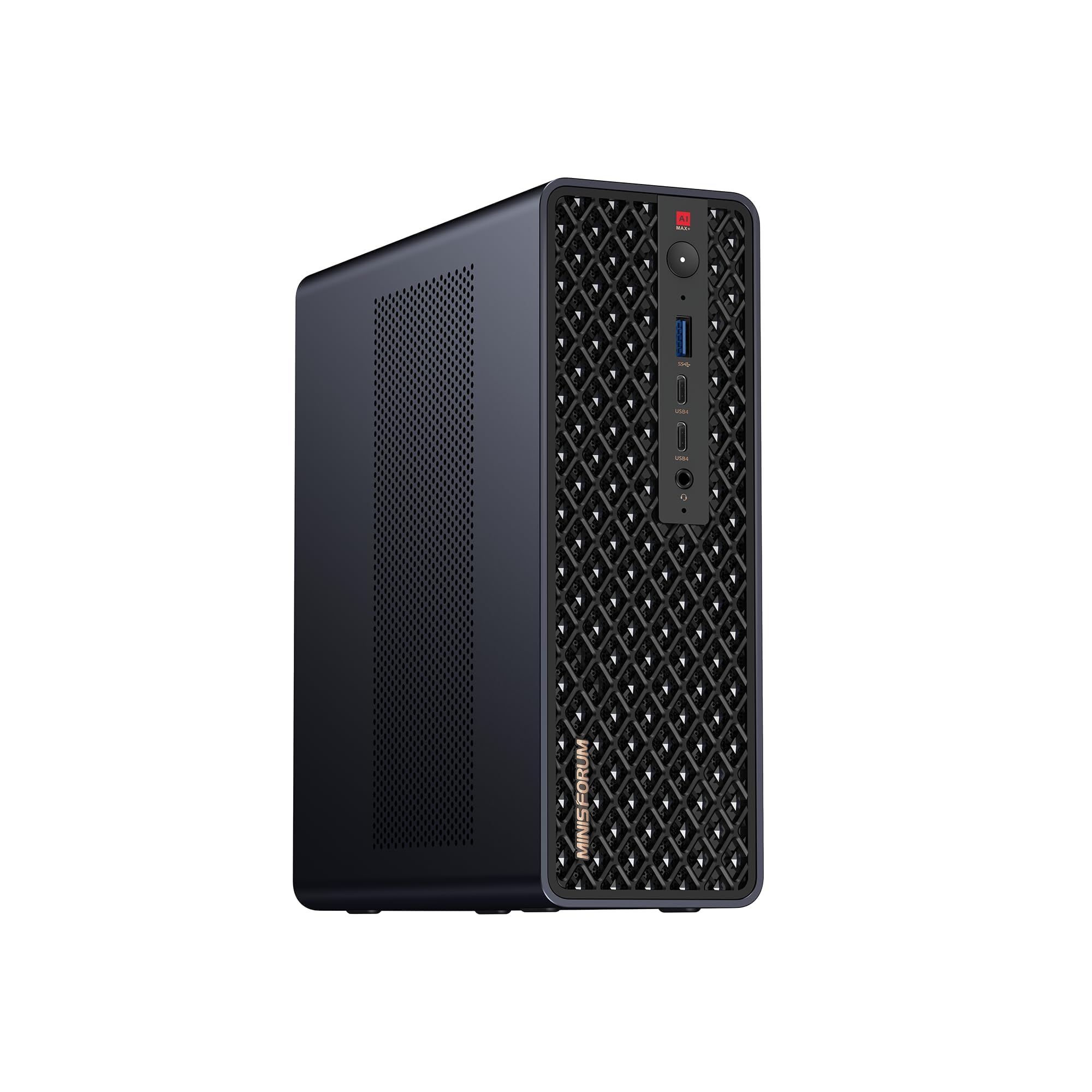
Most Ryzen AI Max+ 395 boxes share the same chip. The MS-S1 Max adds what the others leave out: a full-length PCIe x16 slot, two 10GbE ports, 80Gbps USB4 v2 and a 2U rack mode. The question for buyers is whether those extras justify $2,599 for a 64GB configuration.
The silicon: strong, but not unique
The 126 TOPS headline needs some context. The 50 TOPS NPU handles Windows AI features and some lightweight models, but popular local LLM runtimes mostly run inference on the RDNA 3.5 GPU. For practical purposes, judge this machine by its GPU and its memory, not by the combined TOPS figure.
The 16-core Zen 5 CPU is just as useful for compiling, running containers and video exports. Other mini PCs and desktops built on the Ryzen AI Max+ 395 share exactly the same compute. The Framework Desktop is the best-known example. Nothing on the spec sheet makes this unit faster per token than those machines.
Memory: 64GB is a hard limit
Unified memory means the CPU and GPU draw from one 64GB pool. The operating system, your apps and the model weights all compete for that space.
A 70B model at Q4_K_M quantization fits, but there isn't much room left for a long context window. Models at 30B and below run with comfortable headroom. Dense models above 100B parameters won't fit on one unit at all.
The 64GB limit matters more than any other spec here. If your plan is "run the biggest open-weight model I can on one box," this configuration is the wrong tool, regardless of how many ports it has.
The real reason to buy it: connectivity
The other machines in this class are essentially sealed appliances. This one is closer to a small server:
| Feature | What it lets you do |
|---|---|
| Full-length PCIe x16 slot | Fit a faster NIC, a capture card or a storage controller |
| Dual 10GbE | Serve models to a home or studio network, or link nodes, without a USB adapter |
| USB4 v2 (up to 80Gbps) | Connect fast external storage and docks |
| Dual M.2 (up to 16TB, RAID 0/1) | Mirror a model library, or stripe it for faster loading |
| Rack mode and cluster power-on header | Mount it in 2U and power several units on or off together |
These features address the memory limit in a different way. Minisforum positions the machine as a cluster node: two or more units linked together can serve models that one 64GB box cannot. A later section covers what those cluster claims mean in practice.
Design, build and cooling
The MS-S1 Max is designed like a small server node. The chassis is aerospace-grade aluminium alloy, and it is built around a slide-out internal tray rather than a sealed shell. Swapping one of the two M.2 SSDs, adding a second drive for a RAID 1 mirror, or fitting a card in the full-length PCIe x16 slot means sliding the tray out, not removing every panel and ribbon cable. For a homelab box that will change roles (inference node one month, NAS-adjacent storage host the next), this matters more than it would on a sealed appliance. On most Strix Halo mini PCs, the motherboard is the end of the upgrade path.
The trade-off is size. A machine that holds a full-length expansion card and an internal power supply cannot be as small as the most compact Ryzen AI Max+ 395 boxes. It sits closer to a compact desktop than a palm-sized mini PC, so plan for that footprint on the desk.
Thermal hardware and what it is rated for
Minisforum specifies the cooling stack in unusual detail, and its components match a design meant to hold clocks rather than to hit short benchmark bursts:
| Component | Specification | Why it matters |
|---|---|---|
| Base plate | Copper | Pulls heat off the large Strix Halo package evenly |
| Heat pipes | Six | Moves heat to the fin stack before the die saturates |
| Fans | Dual turbine (blower-style) | Builds static pressure through dense fins; exhausts in a fixed direction |
| Thermal interface | Phase-change material (PCM) | Resists pump-out over long heat cycles better than typical paste |
| Sustained power | 130W | The figure that governs long inference runs and renders |
| Peak power | 160W | Short bursts such as prefill spikes and compile jobs |
| Power supply | 320W, internal | No external brick; headroom for a PCIe card |
The 130W sustained rating is the useful number. Local LLM generation is mostly limited by memory bandwidth, but prefill and long batch jobs keep the GPU busy for minutes at a time. A system that holds its rated power avoids the throughput slide you get when a chassis heat-soaks. The PCM interface supports this, since phase-change material is chosen to hold contact quality over repeated heat cycles in always-on machines.
The built-in 320W supply
The power supply is internal, so a single IEC cable replaces the laptop-style brick that most Strix Halo mini PCs need. On a desk that removes one more box from the cable tangle. In a 2U rack it matters more, because an external brick has nowhere tidy to sit and tends to end up loose on a shelf or zip-tied to a rail. The 320W capacity also leaves room above the 160W peak for a NIC, capture card or storage controller in the PCIe slot, plus attached USB devices.
Four modes, and the noise you should expect
The four selectable profiles trade fan noise against sustained clocks. Silent suits a desk where the machine mostly idles or runs smaller models. Balanced fits mixed daily use. Performance keeps the most power for long inference or rendering jobs. Rack is designed for deployment next to other equipment, where noise does not matter and steady airflow does.
Be realistic about acoustics. Turbine fans are audible under long inference runs. Blowers produce a higher-pitched sound than the large axial fans in a tower PC or a Mac Studio, and a sustained 130W load keeps them spinning. If the MS-S1 Max sits a metre from your chair and you plan to run long generation jobs, expect to hear it or accept lower clocks in silent mode. If it goes in a cupboard, a rack or a utility room, this mostly stops being an issue.
Placement follows from the blower design. Turbine fans exhaust in a fixed direction, so leave the outlet clear and do not push the unit against a wall or stack other gear on top of it. In a rack, the 2U form factor and dedicated rack mode are designed for that setting; check that the exhaust direction suits your cabinet's airflow before mounting several units together.
| Chip | AMD Ryzen AI Max+ 395 |
|---|---|
| Unified Memory | 64 GB |
| Memory Bandwidth | 256 GB/s |
| Tokens/sec (70B) | 5 tok/s |
Expansion, networking and clustering
Most Ryzen AI Max+ 395 mini PCs share the same core silicon, so I/O is where they differ, and the MS-S1 Max has more of it than most. The headline ports cover fast external storage, multi-gigabit networking and high-resolution displays. Two of them, USB4 v2 and dual 10GbE, are also what make the clustering features practical.
| Interface | Specification | What it's good for |
|---|---|---|
| USB4 v2 | Up to 80Gbps | Fast external NVMe enclosures, docks, host-to-host links |
| Ethernet | Dual 10GbE | NAS traffic, serving models to a LAN, node-to-node links |
| HDMI 2.1 | Up to 8K60 | High-resolution editing displays |
| Wireless | Wi-Fi 7 | Placement away from a wired drop |
| Internal storage | Dual M.2, up to 16TB, RAID 0/1 | Model libraries, mirrored boot or scratch space |
| Expansion | Full-length PCIe x16 slot | NIC, capture card or storage controller |
Storage and networking. The two M.2 slots let you split the drives by role. RAID 1 mirrors them for a homelab box that has to stay up, and RAID 0 stripes them for scratch space. A few quantized 70B open-weight models take up hundreds of gigabytes, so the 16TB ceiling is useful for anyone who keeps many models on hand. Dual 10GbE means you can put one port on your LAN and dedicate the other to storage or a node-to-node cluster link, so inference traffic and file traffic don't share a port.
The PCIe slot. This is the feature that separates the MS-S1 Max from most other Strix Halo machines. A full-length PCIe x16 slot means you can fit:
- a faster NIC, such as 25GbE or higher, for multi-node inference or heavy NAS traffic
- a capture card for streaming or video ingest
- a storage controller if you need more drives than the M.2 slots allow
Other Ryzen AI Max+ 395 mini PCs in this class generally offer no full-size expansion slot, leaving external USB4 enclosures as the only option. If you know you'll need a card, this slot alone can justify the price premium.
Clustering, according to Minisforum. The listing makes the following claims:
- Two units ran a 235B-parameter model at Q4 at 10.87 tok/s.
- Four units ran DeepSeek-R1 671B at Q4.
- The chassis supports 2U rack deployment.
- A rack mode sits alongside the performance, balanced and silent modes.
- A dedicated cluster power-on header handles synchronized start-up and shutdown across nodes.
The power-on header solves a real problem: in a rack, you don't want to power on four boxes one by one. A rate of 10.87 tok/s is fast enough for a 235B model to be usable as a chat assistant. It is still well below what a 30B–70B model runs at on a single node.
Run the memory numbers before you rely on these figures. A 4-bit 671B model needs well over 300GB just for its weights. Four 64GB units total only 256GB of unified memory. A 235B model at Q4 also comes close to the 128GB that two 64GB units provide, before counting the context window. Minisforum doesn't say which memory configuration produced its results. Treat them as a demonstration of what the platform can do, not a forecast for the $2,599 64GB model.
These cluster results come from Minisforum, not from independent benchmarks. Multi-node tok/s depends heavily on the interconnect and the software stack, so your numbers may differ.
Two factors decide how well a cluster performs:
- The interconnect: USB4 v2, 10GbE, or a faster NIC in the PCIe slot.
- The software: distributed backends such as llama.cpp's RPC mode split work across nodes with very different efficiency, and prompt processing (prefill) usually suffers more than generation does.
Cost matters too. At the current $2,599 price, four units come to $10,396 before switches, cabling or a rack. At that budget, price a single machine with more unified memory before you commit to a cluster.
How it compares to other Strix Halo and Apple silicon machines
The MS-S1 Max's rivals fall into three camps: other Ryzen AI Max+ 395 boxes, Apple silicon Mac Studio models, and Nvidia DGX Spark-class machines. Each solves the same problem of running a local LLM from a large pool of unified memory, but each gives up something different. The right choice depends less on benchmark charts than on which trade-off you can live with.
Against other Strix Halo machines: same chip, different chassis
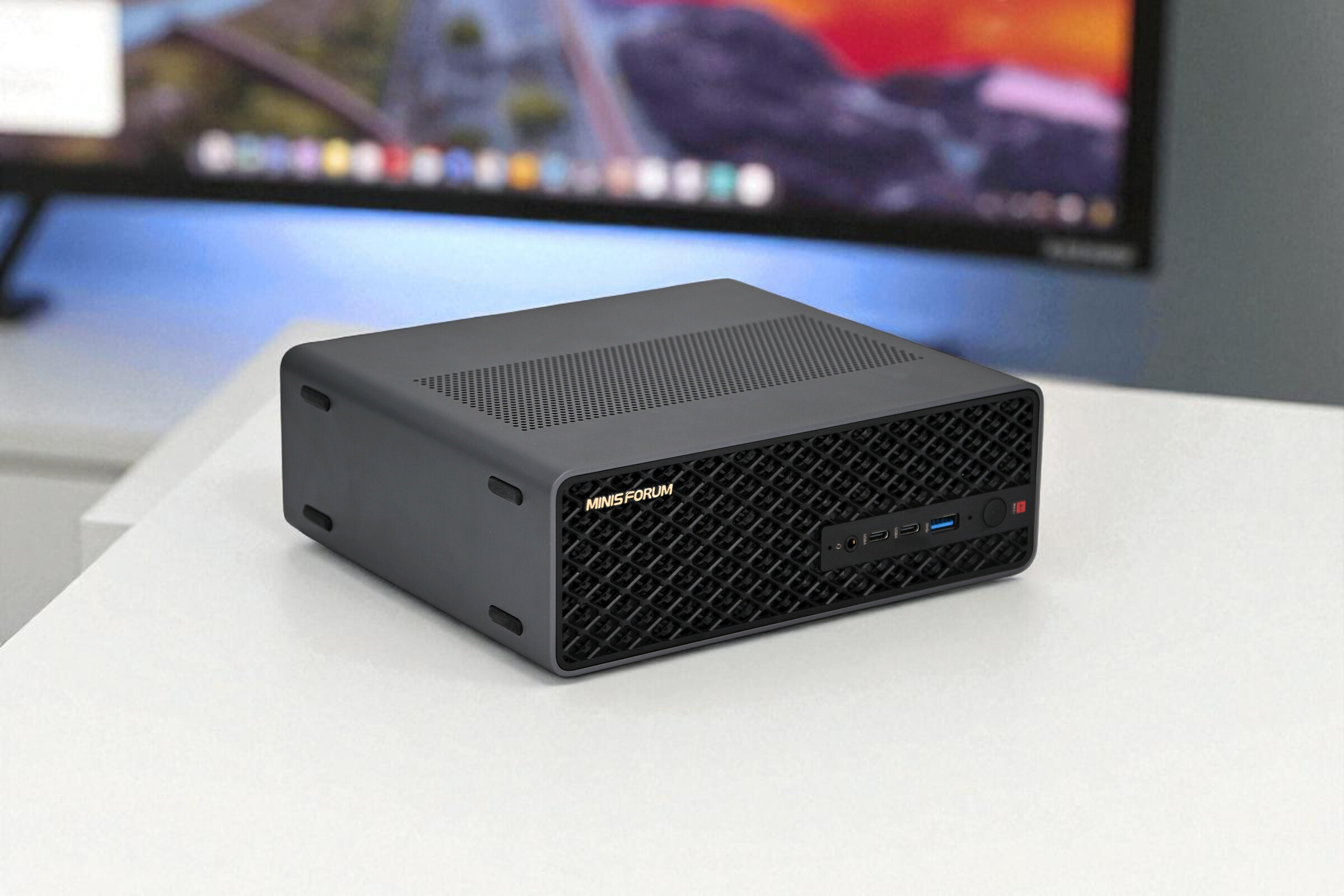
The Framework Desktop and the other Ryzen AI Max+ 395 mini PCs use the same silicon: the same 16-core Zen 5 CPU, the same RDNA 3.5 GPU, and the same 256-bit LPDDR5x memory bus. At a given memory configuration, tokens per second on a 70B Q4_K_M model will land in the same range on all of them. Small differences come from sustained power limits and cooling, not from architecture.
The MS-S1 Max does not justify its price with speed. It justifies it with the full-length PCIe x16 slot, dual 10GbE, the internal 320W power supply and a dedicated rack mode, plus the reserved cluster power-on header for starting and stopping several units together. If your Strix Halo box will sit on a desk running Ollama over Wi-Fi, those features cost money you won't recover. If it will sit in a 2U space serving models across a 10GbE network, or needs a capture card or faster NIC, few rivals on this platform offer the same flexibility.
Against Apple silicon: more bandwidth, no expansion
Higher-tier Mac Studio models offer more memory bandwidth and larger unified memory options than any Strix Halo machine. More bandwidth raises generation speed in tok/s. Larger memory ceilings let you run models that 64GB cannot hold at all. If your goal is one quiet box for 100B+ dense models, Apple silicon is the stronger path, though those configurations cost considerably more.
What the Mac Studio lacks is everything the MS-S1 Max is built around. It has no PCIe expansion, no 2U rack form factor and no rack mode. It also runs macOS rather than the Linux and Windows stack most homelab and self-hosting setups expect. You buy a Mac Studio for capacity and polish, and you buy the MS-S1 Max to integrate it into infrastructure.
Against DGX Spark-class machines: the CUDA question
Nvidia's DGX Spark-class desktops win where software maturity matters most. CUDA support means faster prompt processing (prefill), which cuts time to first token on long context windows. It also means a smoother path for fine-tuning, where the ROCm and Vulkan backends on Strix Halo still require more manual work. If your workflow involves long-document retrieval-augmented generation (RAG), agent loops with large prompts, or training adapters rather than inference alone, that ecosystem advantage outweighs the MS-S1 Max's I/O.
| If your priority is… | Strongest fit | What you give up |
|---|---|---|
| PCIe card, 10GbE, rack deployment | MS-S1 Max | Memory capacity per dollar |
| Lowest-cost Strix Halo inference | Other Ryzen AI Max+ 395 boxes | PCIe slot, 10GbE, internal power supply |
| Largest single-machine models, highest bandwidth | Apple silicon Mac Studio | Expansion, rack design, Linux-first workflow |
| Fast prefill, fine-tuning, CUDA tooling | DGX Spark-class machines | x86 flexibility and the MS-S1 Max's I/O |
Range across the products compared here
Where it lands in the field
The bars show the pricing trade-off. At $2,599, the MS-S1 Max is priced for its I/O, while its 64GB of unified memory is a mid-range capacity for this class; the larger Apple silicon configurations go well beyond it.
That gap is the clearest summary of the comparison. Measured on gigabytes per dollar, the MS-S1 Max loses to most of its competitors. Measured on ports, slots and deployability per dollar, it is the strongest Strix Halo option covered here. Decide which of those two numbers matters for your setup before you compare prices.
Who should buy it and who should skip it
The MS-S1 Max makes sense when you will use the PCIe x16 slot, the dual 10GbE ports or the 2U rack and cluster features. Without those, most of the $2,599 pays for connectivity you won't touch, and the 64GB of unified memory is the same capacity limit every 64GB Strix Halo machine has.
Homelab and self-hosting users are the clearest fit. If you already run a 10GbE switch, the two onboard ports let the box serve a local LLM endpoint, a NAS share and a VM host at full line rate without an adapter. The rack mode and reserved cluster power-on interface show it was designed to sit in a cabinet, not under a monitor.
Small creative studios also have a good case. HDMI 2.1 drives an 8K60 display, USB4 v2 at up to 80Gbps handles fast external drives and docks, and the dual M.2 slots run RAID 0 for scratch speed or RAID 1 for redundancy up to 16TB. The 16-core Zen 5 CPU and shared memory pool help with long video timelines, and the slide-out tray makes adding a second SSD a quick job.
Developers serving models at 70B parameters and below get the most from the hardware. A 70B model at Q4_K_M quantization needs roughly 40GB, which leaves room for a usable context window inside 64GB. If you expect to add a 25GbE NIC or another card later, the PCIe slot saves you from an external USB4 enclosure.
Teams planning a small 2U cluster should consider it too. The vendor cluster figures covered above are unverified, but the rack mode and power-on header support a start-small path: buy one node now and add more later.
Where it's the wrong machine
100B+ dense models on a single box. A dense model above 100B parameters at 4-bit quantization needs more than 60GB for weights alone. That doesn't fit in 64GB once the OS, the KV cache and a reasonable context window take their share. If single-machine capacity is your main goal, a configuration with more unified memory is the better buy, even if it has fewer ports.
CUDA-dependent workflows. Strix Halo runs inference through ROCm, Vulkan and llama.cpp-style backends. Prompt processing (prefill) on RDNA 3.5 is slower than on Nvidia hardware, so time to first token grows on long prompts. Fine-tuning scripts, custom CUDA kernels and tools that only support Nvidia won't run as-is. A DGX Spark-class machine or a CUDA GPU is the practical choice there.
A quiet, cheaper desktop chat assistant. If you want to run a 7B–32B model for chat and coding help, this machine is more than you need. Silent mode helps, but dual turbine fans sized for 160W peaks will never be as quiet as a fanless or low-power setup. Other Strix Halo mini PCs with the same chip and memory cost less because they leave out the PCIe slot, the 10GbE ports and the rack features.
Good for
- Homelab owners with a 10GbE network who want one box for local LLM inference, file serving and VMs
- Small studios that need 8K60 output, 80Gbps USB4 v2 storage and mirrored or striped M.2 RAID
- Developers serving 70B-and-below open-weight models who want to add a faster NIC or another PCIe card later
- Teams planning a multi-node 2U rack cluster with unified power-on control
Not for
- Anyone who wants to run 100B+ dense models on one machine, since 64GB isn't enough
- CUDA-based pipelines, fine-tuning workflows or prefill-heavy workloads where Nvidia's software support matters
- Buyers who want a silent, cheaper desktop chat assistant and will never use the PCIe slot or 10GbE ports
| Your priority | Buy or skip | Deciding factor |
|---|---|---|
| 10GbE local inference server | Buy | Dual onboard 10GbE, rack mode |
| PCIe card in the same chassis | Buy | Full-length x16 slot |
| 8K editing with fast RAID scratch | Buy | HDMI 2.1 8K60, dual M.2 RAID 0/1 |
| Largest model on one box | Skip | 64GB unified memory limit |
| CUDA tooling or fine-tuning | Skip | No CUDA, slower prefill |
| Quiet, low-cost chat assistant | Skip | Paying for I/O you won't use |
Pros
- 64GB shared memory sidesteps VRAM limits
- Dual 10GbE for multi-unit clustering
- PCIe x16 slot for add-in cards
- USB4 V2 80Gbps for fast storage
- Internal 320W PSU, no power brick
Cons
- 235B Q4 needs two units
- Soldered LPDDR5x: no memory upgrades
- ROCm tooling trails CUDA support
Verdict
The MS-S1 Max is the most expandable Strix Halo mini PC you can buy: worth $2,599 if you will use the PCIe x16 slot, dual 10GbE and rack or cluster features, and overbuilt if you only want the largest local LLM that fits on your desk.
The Ryzen AI Max+ 395 inside the MS-S1 Max is the same chip used by every other Strix Halo box, so model capacity and generation speed are not what set it apart. With 64GB of unified memory and roughly 256 GB/s of memory bandwidth, it runs 4-bit quantized models up to about 70B parameters at the same tokens per second as its Strix Halo rivals. The premium pays for everything around the chip: a full-length PCIe x16 slot, dual 10GbE, USB4 v2 at 80Gbps, a built-in 320W power supply, a 2U rack mode and a cluster power-on header. Few, if any, other Strix Halo machines combine all of these in one chassis.
Buy it for the I/O
The MS-S1 Max is worth its price when those ports are part of the plan. A homelab that serves models over a 10GbE network, a studio that needs a capture card or storage controller in the PCIe slot, or a team racking several units for distributed inference will use hardware that would otherwise mean adapters, external enclosures or a second machine. Minisforum's two-unit 235B result is a manufacturer figure, but the rack mode and cluster header show the hardware was designed for multi-node work.
The 130W sustained / 160W peak power envelope with no external power brick also fits that role. It is sized to run inference continuously in a rack or closet, with switchable performance, balanced, silent and rack modes.
Skip it if memory capacity is the goal
If your only question is "how big a model can I fit for the money," the MS-S1 Max is overbuilt and overpriced at 64GB. At this price you pay for networking and expansion, not extra memory. A 70B model at Q4_K_M runs, but large context windows quickly use up the remaining headroom, and 100B+ dense models do not fit at all. The cluster route works, but it means buying two or more units at $2,599 each.
Buyers focused on capacity have better options. A Strix Halo box without the server-grade I/O delivers the same inference performance for less. Apple silicon Mac Studio configurations offer more unified memory and higher memory bandwidth for single-machine model capacity. Prompt processing (prefill) on RDNA 3.5 also still trails CUDA hardware, so long prompts mean a slower time to first token than on an Nvidia DGX Spark-class system.
| If your priority is… | MS-S1 Max fit | Why |
|---|---|---|
| Serving 70B-and-below models on a 10GbE LAN | Strong | Dual 10GbE built in, no adapters needed |
| Adding a NIC, capture card or storage controller | Strong | Full-length PCIe x16 slot behind a slide-out tray |
| Rack or multi-node cluster inference | Strong | 2U rack mode, cluster power-on header, USB4 v2 |
| Fitting the largest model on one machine | Weak | Capped at 64GB of unified memory |
| Fast prefill and CUDA-only tooling | Weak | RDNA 3.5 with ROCm/Vulkan, not CUDA |
| Lowest cost per GB of memory | Weak | Price goes to I/O, not capacity |
Bottom line: buy the MS-S1 Max because you need a small, well-cooled Strix Halo machine that behaves like a server, with PCIe, 10GbE and rack features you will actually use. If you only want to run the largest local LLM possible, spend the money on memory capacity instead.
Disclosure: we may earn a commission from purchases made through retailer links on this page, at no extra cost to you. This does not affect our assessment.