Apple Mac Studio (M3 Ultra) review: the 512GB desktop for local LLMs

Up to 512GB of unified memory for very large local LLMs on one desk
- Chip
- M3 Ultra
- Unified Memory
- 96 GB
- Memory Bandwidth
- 819 GB/s
- Tokens/sec (70B)
- 14 tok/s
- 512GB memory fits huge quantized models
- 80-core GPU speeds token generation
- No CUDA: some AI tools unsupported
No other compact desktop gives the CPU and GPU one shared pool of up to 512GB. That makes the M3 Ultra Mac Studio one of the few single machines able to hold a quantized model with hundreds of billions of parameters entirely in memory. The question is whether your workload actually needs that ceiling, or whether you'd be paying for headroom you never touch.
| Chip | M3 Ultra |
|---|---|
| Unified Memory | 96 GB |
| Memory Bandwidth | 819 GB/s |
| Tokens/sec (70B) | 14 tok/s |
Design and build quality
The Mac Studio's pitch is simple: workstation-class compute in a small aluminum box that sits on the desk instead of under it. With the M3 Ultra inside, the chassis houses up to a 32-core CPU, up to an 80-core GPU and up to 512GB of unified memory. That is a level of capacity that, on the PC side, usually means a full tower, multiple graphics cards and the fan noise that comes with them.
That compact footprint matters most in rooms where noise and space are part of the job: music studios with open microphones, edit bays where a colorist sits within arm's reach of the machine, and home offices where a tower would take over the floor. The Mac Studio fits between a pair of monitors or under a display stand. You don't have to plan your room around it.

Ports where you actually need them
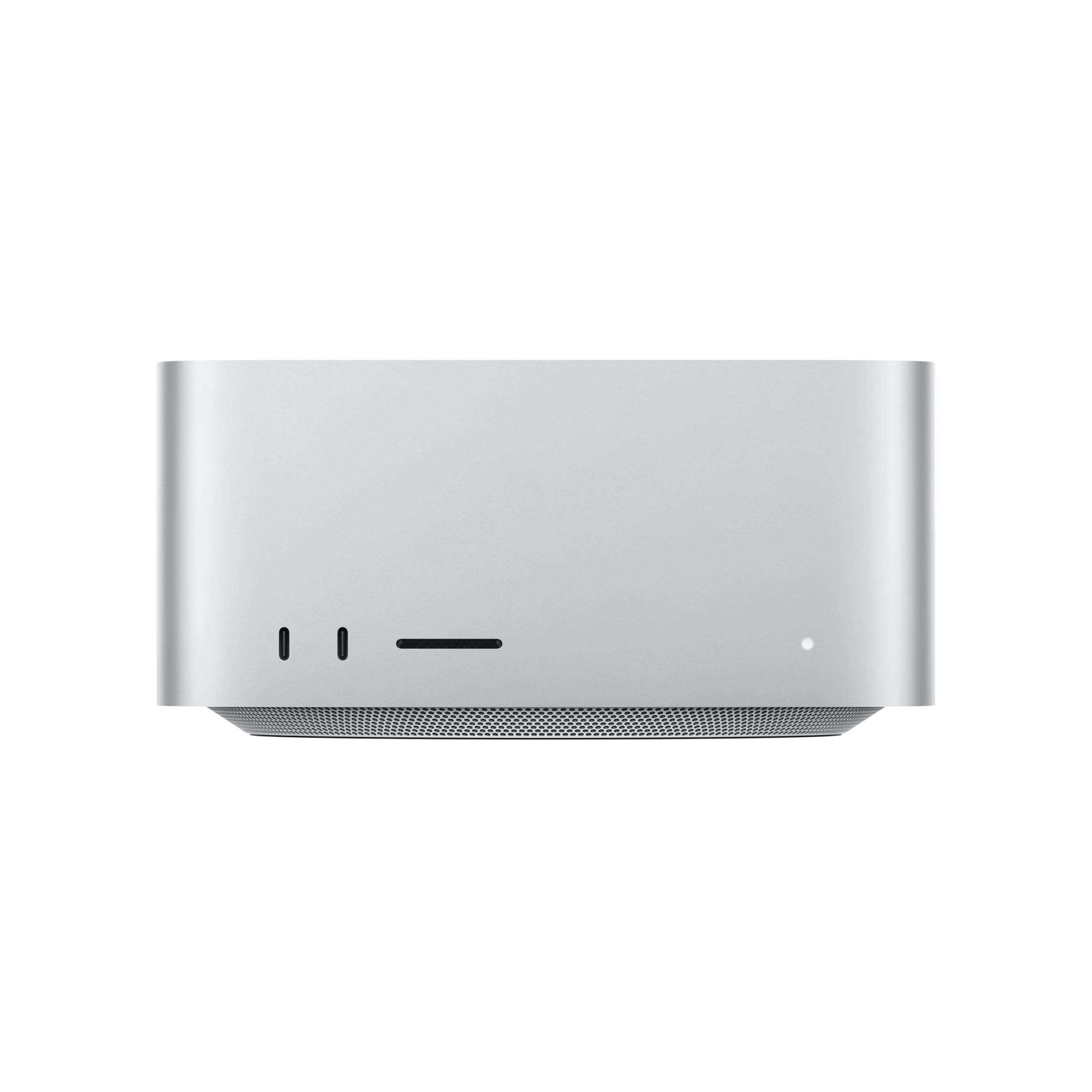
Apple splits the I/O between front and rear. Permanent connections like displays, Ethernet and docks go at the back. Card readers and quick-swap drives sit at the front, within reach.
A photographer offloading cards or an editor shuttling project drives between suites can plug in from the chair instead of reaching behind the machine or turning it around. The full port rundown, including Thunderbolt 5 bandwidth and display support, is covered in the connectivity section below.
Sealed by design: what you buy is what you keep
The defining build decision is also the one with the biggest financial consequence. Unified memory and the internal SSD are configured once, at purchase, and cannot be added later. Unified memory is part of the Apple silicon package. There are no RAM slots to fill and no spare drive bay for a second internal SSD.
That changes how you should approach the order page:
| Decision | Configurable range | What happens if you under-buy |
|---|---|---|
| Unified memory (M3 Ultra) | Up to 512GB | No upgrade path. You live with the ceiling or replace the whole machine |
| Unified memory (M4 Max, same chassis) | Up to 128GB | Same constraint, with a much lower ceiling |
| Internal SSD | 512GB to 16TB | You can add external storage, but the internal drive stays the size you chose |
On a tower PC, buying too little RAM is a cheap fix you can make next year. On the Mac Studio, it's permanent. For local LLM work, the memory ceiling decides which open-weight models you can load at all: a 70B model at 4-bit runs within the M4 Max's 128GB, while ~400B-class models need 256GB or more and ~670B-class models need the full 512GB (see the sizing table below). Size memory for the largest model or project you expect to run over the machine's lifetime, not the one you're running today.
Storage is more forgiving than memory, because external drives can absorb overflow. Still, a model library or an 8K project that lives on an external drive is one more cable and one more failure point. Buyers who keep many quantized model variants on hand, or who work with large raw footage, will find the internal drive fills faster than expected.
Long-term ownership
The sealed design has real upsides. There are no loose components to reseat and no driver-matched GPU to swap out. The compact enclosure keeps the whole system as a single, predictable unit. The trade-off is that your purchase-day configuration is effectively a multi-year contract.
In practice:
- Resale and longevity depend almost entirely on the memory and SSD tier you picked. Higher-memory configurations stay useful longer as models and project files grow.
- Expansion happens externally. Faster storage, more storage and extra displays all connect over the ports rather than going inside the box.
- Repair means sending it in. You can't diagnose and replace a single failed component yourself the way you could in a modular tower.
If you budget for the M3 Ultra, plan the extra spend around memory before anything else.
Performance for local LLMs, video and 3D
The M3 Ultra is built for two kinds of work: running very large language models locally and heavy multi-stream media work. These depend on different parts of the chip. LLM throughput depends mostly on memory, while video and 3D lean on cores and media engines. Knowing which one limits your workload tells you whether the Ultra's premium buys you anything.
Range across the products compared here
Local LLMs: memory capacity decides fit, bandwidth decides speed
For local LLM inference, generating each token means streaming the model's active weights through the chip. That makes memory bandwidth the main limit on tokens per second (tok/s), more than core count. Extra GPU cores help less than you might expect once the model is large.
Total unified memory decides a more basic question: whether a model loads at all. Weights, the KV cache for your context window, and macOS all share the same pool. The rough sizes below assume Q4_K_M quantization, which works out to about 4.5–5 bits per weight. Treat them as estimates for planning, not exact figures.
| Model size (parameters) | Approx. weights at Q4_K_M | Practical fit |
|---|---|---|
| 8B | ~5 GB | Any modern Mac |
| 70B | ~40–45 GB | Comfortable on 128GB (M4 Max) |
| ~120B-class | ~70 GB | 128GB works, with limited room for long context |
| ~400B-class | ~240 GB | Needs M3 Ultra with 256GB or more |
| ~670B-class (MoE) | ~400 GB | Only the 512GB configuration |
This table explains why the Ultra exists. A 70B model at 4-bit runs on an M4 Max, so the Ultra adds speed headroom rather than capability. At the 400B–670B scale, the 512GB configuration is one of the few single quiet desktops that can hold the weights. The alternative is splitting the model across several GPUs. Mixture-of-experts models suit this machine well: they need the full pool to load, but only a fraction of the parameters are active per token, so generation speed stays usable.
Prompt processing (prefill) reads your entire input before the first output token appears. That work is compute-bound and runs on the GPU, and Apple silicon is noticeably slower at it than high-end discrete GPUs. With short chats you won't notice. If you paste a long codebase, a contract bundle or a 100K-token RAG context, time to first token (TTFT) grows substantially and can stretch from seconds into minutes on the largest models. If your workflow is mostly long-document analysis rather than long generation, factor that wait into your decision.
Video editing and 3D rendering
The up to 32-core CPU and up to 80-core GPU suit work that keeps many cores busy at once:
- multi-stream 8K timelines
- heavy color grades and noise reduction
- GPU path-traced 3D renders
Apple silicon's dedicated media engines handle ProRes encode and decode in hardware. In ProRes-heavy workflows, that leaves the CPU and GPU free for effects and grading instead of decoding playback. The large memory pool also lets big scenes, texture sets and caches stay in RAM. That matters for 3D artists whose scenes would overflow a typical discrete card's memory.
The caveat for 3D is the same as for prefill. When a scene fits comfortably on a top-tier discrete GPU, raw render speed generally favors that GPU. The Ultra's advantage is scenes and projects that wouldn't fit anywhere else on one desktop, not shorter render times for typical jobs.
Where it sits among rivals
Strix Halo systems (AMD Ryzen AI Max) use the same unified memory idea and cost much less. Their memory ceiling, though, is far below 512GB. They handle 70B-class models well, but the 400B+ open-weight models in the lower rows of the table above don't fit on them.
That leaves a clear buying rule:
- Your largest model fits in 128GB: Strix Halo or an M4 Max covers it for less.
- Your models exceed 128GB: the M3 Ultra is the realistic single-box choice, as long as you accept slower prefill than a multi-GPU workstation.
Connectivity and displays
The M3 Ultra's I/O suits a desk where storage, screens and network shares do much of the work. Three things matter for buyers: Thunderbolt 5 bandwidth, an eight-display ceiling, and 10Gb Ethernet built in. Together they decide whether a cheaper internal SSD is viable and whether the machine can drive a full multi-monitor workspace.
Thunderbolt 5 and the external-storage strategy
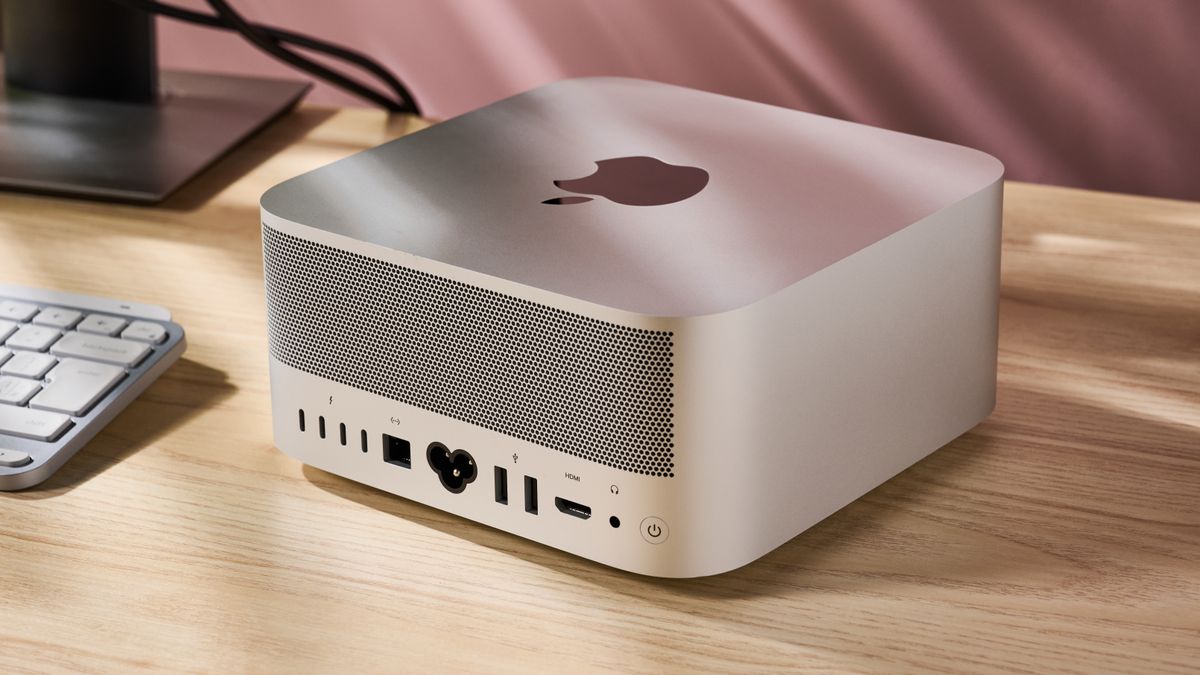
Thunderbolt 5 is rated up to 120Gb/s. That headline figure applies to Bandwidth Boost, an asymmetric mode that favours display output. Standard bidirectional bandwidth is 80Gb/s, still double Thunderbolt 4. In practice, a multi-drive NVMe enclosure or a dock carrying storage, a display and peripherals no longer saturates the link the way it often did on older Macs.
This changes the SSD calculation. Internal storage is fixed at purchase, and the jump from 2TB to 8TB or 16TB carries a steep Apple premium. A reasonable split is:
- Internal SSD for the OS, apps, active projects, and the models you load every day.
- External Thunderbolt 5 NVMe for your full open-weight model library (several 4-bit quantized 70B-class checkpoints at roughly 40GB each add up quickly) and for 8K camera originals.
The external array won't match internal speed in every workload. Even so, it is fast enough that loading a model or scrubbing footage from it rarely feels like a compromise. It also stays useful when you replace the computer.
Pro tip
Budget the internal SSD around your working set, not your archive. If your active models and current projects fit in 2TB, buy 2TB internally. Then spend the difference on a Thunderbolt 5 NVMe enclosure. Unlike unified memory, external storage can be expanded later.
Eight displays: who actually needs them
The M3 Ultra drives up to eight displays, at resolutions up to 8K. The M4 Max configuration tops out at five. Most single-editor or developer desks never reach five screens, so this is a niche advantage. Where it applies, though, it is decisive:
| Setup | Why display count matters |
|---|---|
| Trading desks | Charts, order books, news and chat often span six or more panels from one machine |
| Control rooms / broadcast monitoring | Multiview walls and status dashboards without a separate video-wall controller |
| Colour-grading suites | Grading UI, scopes, client reference monitor and a dedicated mastering display at once |
| Large-model dev workstations | Rarely needs more than two or three, so this is not a reason to choose Ultra |
If you are choosing the M3 Ultra only for display count, check whether five screens would cover your setup. If they would, the M4 Max handles it for much less money.
HDMI 2.1 and 10Gb Ethernet
HDMI 2.1 lets you connect a TV-class panel or client monitor directly, with no adapter in the signal chain. That matters in grading rooms and meeting spaces, where a dongle is one more thing that can fail during a session.
10Gb Ethernet has the bigger daily impact. Its theoretical maximum is about 1.25GB/s, roughly ten times standard gigabit. A 40GB set of model weights stored on a NAS arrives in well under a minute on a fast storage target, compared with more than five minutes over gigabit. NAS-based editing teams benefit as well: proxy-free playback of high-bitrate codecs from shared storage becomes realistic, as long as the switch and NAS also run at 10GbE. The port only delivers if the rest of the network keeps up. A 1Gb switch upstream caps you at gigabit speeds regardless.
The USB 3 ports cover keyboards, audio interfaces and card readers. Those don't need Thunderbolt bandwidth, so they leave the Thunderbolt 5 ports free for storage and displays. The result is a desktop that can serve as the hub of a studio rather than one more box connected to a dock.
How it compares to the alternatives
| Product | Rating | Price | Buy |
|---|---|---|---|
 Apple Mac Studio (M3 Ultra) Up to 512GB of unified memory for very large local LLMs on one desk +512GB memory fits huge quantized models+80-core GPU speeds token generation -No CUDA: some AI tools unsupported | Buy → | ||
 Apple Mac mini (M4 Pro, 64GB) 64GB unified memory for 70B-class local models in a desk-sized box +64GB shared memory fits 70B-class quants+Small chassis runs quietly on a desk -No CUDA, so fewer fine-tuning tools | Buy → | ||
| Apple Mac Studio (M4 Max) Up to 128GB unified memory in a 7.7-inch box for large local models +128GB unified memory loads large models+7.7-inch square fits under monitors -No CUDA: some AI tools unsupported | $3,399.00 | Buy → | |
 GMKtec EVO-X2 (Ryzen AI Max+ 395, 128GB) 128GB unified memory to run 70B-class models locally +128GB shared memory: fits 70B models+120W mode for long inference runs -Soldered memory: cannot upgrade beyond 128GB | $3,499.99 | Buy → | |
 Minisforum MS-S1 Max Best Value Ryzen AI Max+ 395 mini PC with dual 10GbE and a PCIe x16 slot for LLM clusters +64GB shared memory sidesteps VRAM limits+Dual 10GbE for multi-unit clustering -235B Q4 needs two units | $2,599.00 | Buy → | |
 NVIDIA DGX Spark 128GB unified memory and a 4TB SSD for running large open-weight LLMs on your desk +128GB memory: larger models fit+4TB SSD stores many models -Upgrade voids NVIDIA's original warranty | $8,699.99 | Buy → |
Prices as of Nov 16, 2026; they may have changed since.
Who it's for and who should skip it
The M3 Ultra earns its premium in one situation: your working set does not fit in 128GB of unified memory. Above that line, nothing else in Apple's lineup can run the job at all. Below it, an M4 Max does the same work for less.
Buyers who justify the M3 Ultra
AI developers running very large open-weight models locally are the clearest case. Models in the 400B–670B class need roughly 240–400GB at 4-bit before you add a long context window and its KV cache. With up to 512GB of unified memory, those models load on one desktop with no sharding across GPUs. That matters if you work under NDAs, with client data, or in regulated fields where prompts can't leave the building. Running locally keeps every token on your own hardware.
8K and multi-cam editors benefit from the GPU and the display count together. Up to an 80-core GPU handles stacked 8K streams. Up to eight displays at up to 8K, versus five on M4 Max, covers a timeline, scopes, reference monitors and a client screen at once. 10Gb Ethernet and Thunderbolt 5 keep shared NAS storage and external NVMe arrays from becoming the bottleneck.
3D artists with memory-hungry scenes gain because the GPU can address the same large pool as the CPU. Dense geometry, high-resolution texture sets and heavy simulation caches that would overflow a discrete card's VRAM can stay resident. That avoids out-of-core rendering or splitting scenes into passes.
Buyers better served elsewhere
Hobbyists running 8B to 70B models should skip it. Those models fit comfortably within 128GB even at higher-precision quantizations. Generation speed in tokens per second is set mainly by memory bandwidth, not by unused capacity, so a 512GB configuration adds nothing to a 70B chat session. The M4 Max Mac Studio or a well-specced Mac mini handles this tier at a fraction of the cost.
Photographers and single-display editors fall into the same trap. Large raw catalogs and 4K timelines are demanding, but they rarely exhaust 64–128GB. An extra 384GB of memory doesn't make Lightroom exports or a one-monitor edit meaningfully faster. That money is better spent on a larger SSD or a better display.
CUDA-dependent ML engineers and anyone doing model training rather than inference should look at a GPU workstation instead. Apple silicon runs inference well through MLX and llama.cpp. Much of the training ecosystem still assumes NVIDIA hardware, though, including custom kernels, distributed training libraries and mixed-precision tooling. The slower prefill covered above also hurts RAG and agent pipelines that feed large documents.
| Your workload | Memory you actually need | Better-fit machine |
|---|---|---|
| Very large open-weight models, private inference | Well beyond 128GB | Mac Studio (M3 Ultra) |
| 8K multi-cam edits on 6–8 displays | High, plus display count | Mac Studio (M3 Ultra) |
| 8B–70B models, chat and coding assistants | Under 128GB | Mac Studio (M4 Max) or Mac mini |
| Photo editing, single-display 4K video | Typically 32–128GB | M4 Max or Mac mini |
| Fine-tuning, training, CUDA-only toolchains | Varies | Multi-GPU PC workstation |
Good for
- AI developers who need open-weight models far larger than 70B parameters to run locally for privacy or compliance
- 8K and multi-cam editors driving up to eight high-resolution displays from one machine
- 3D artists whose scenes, textures and simulation caches overflow typical GPU memory
- Studios on 10Gb Ethernet NAS storage that want workstation compute without a tower
Not for
- Hobbyists running 8B to 70B models, which an M4 Max or Mac mini handles for far less
- Photographers and single-display editors whose projects fit in 128GB or less
- CUDA-dependent ML engineers whose libraries and kernels assume NVIDIA hardware
- Anyone training or fine-tuning models rather than running inference
- Long-context RAG users who prioritize fast prefill and low time to first token
Pros
- 512GB memory fits huge quantized models
- 80-core GPU speeds token generation
- 120Gb/s Thunderbolt 5 for Mac clustering
- 10Gb Ethernet: faster model file transfers
- 16TB SSD option stores many models
Cons
- No CUDA: some AI tools unsupported
- Prompt processing trails high-end NVIDIA GPUs
- Memory fixed at purchase, not upgradable
Verdict
The M3 Ultra Mac Studio is easy to judge because its value depends on one number: 128GB. That is the M4 Max's unified memory ceiling, and the M3 Ultra raises it to 512GB. If your work needs more than 128GB, the M3 Ultra is one of the simplest ways to get that much GPU-addressable memory. If it doesn't, the M4 Max covers the same work for considerably less.
Buy the M3 Ultra only if your models or projects exceed 128GB of memory. Below that line, the M4 Max Mac Studio gives you the same chassis, ports and Thunderbolt 5 for considerably less.
Above 128GB: it replaces a rack, not a desktop
When a workload exceeds 128GB, compare the M3 Ultra with what you would otherwise need, not with the M4 Max. Here is the rough sizing for 4-bit quantization (Q4_K_M):
- A ~400B-class model needs about 240GB for weights, and a ~670B-class mixture-of-experts model about 400GB.
- Add the KV cache for a long context window, and both land far beyond the M4 Max's 128GB.
- On PC hardware, holding that in GPU memory means spreading the model across a dozen or more 24–32GB cards. That build needs server-class power delivery, cooling and probably a rack.
The M3 Ultra holds the same model in one unified memory pool on a quiet desktop. That pool is shared by the up-to-80-core GPU, so you don't have to split the model across cards or manage interconnects. The same logic applies to very large 8K timelines and 3D scenes that would otherwise force proxies or scene splitting. For private, local LLM inference on frontier-scale open-weight models, the high price buys a lot of capability per watt and per square foot.
Know what you're giving up: prefill on long prompts is slower than on a multi-GPU CUDA build, so time to first token grows with the context window. And if your work is training rather than inference, or depends on CUDA, buying a Mac solves the wrong problem.
Below 128GB: the M4 Max is the better buy
If your largest model is a 70B at 4-bit, or your projects are 4K and 6K timelines, the M4 Max Mac Studio is the better value. It uses the same aluminum enclosure and offers the same Thunderbolt 5 (up to 120Gb/s), HDMI 2.1, 10Gb Ethernet and the same 512GB to 16TB SSD range. The M3 Ultra adds three things over it:
| What the M3 Ultra adds | Who actually needs it |
|---|---|
| Up to 512GB unified memory (vs 128GB) | Users of very large open-weight models and huge media or 3D projects |
| Up to 80-core GPU and 32-core CPU | Heavy multi-stream 8K editing and long render queues |
| Up to eight displays at up to 8K (vs five) | Control rooms, trading desks and large multi-monitor grading setups |
If none of those rows describes your work, the Ultra's premium buys nothing your workload uses. Put that money into a larger SSD on the M4 Max, or a Thunderbolt 5 NVMe enclosure for your model library and footage.
Decide on memory first, because you can't upgrade later
Memory and storage are fixed when you order, so size the machine for the largest workload you expect over three to four years, not the one you have today. A practical test:
- Your models or projects already exceed about 100GB, or you have a concrete plan to run models larger than 70B parameters: choose the M3 Ultra and configure enough memory for that next step.
- Your work fits comfortably under 128GB: choose the M4 Max, max out its memory if your budget allows, and put the savings into storage.
- You are unsure: you probably don't need 512GB yet. The M4 Max at 128GB is the lower-risk choice.